
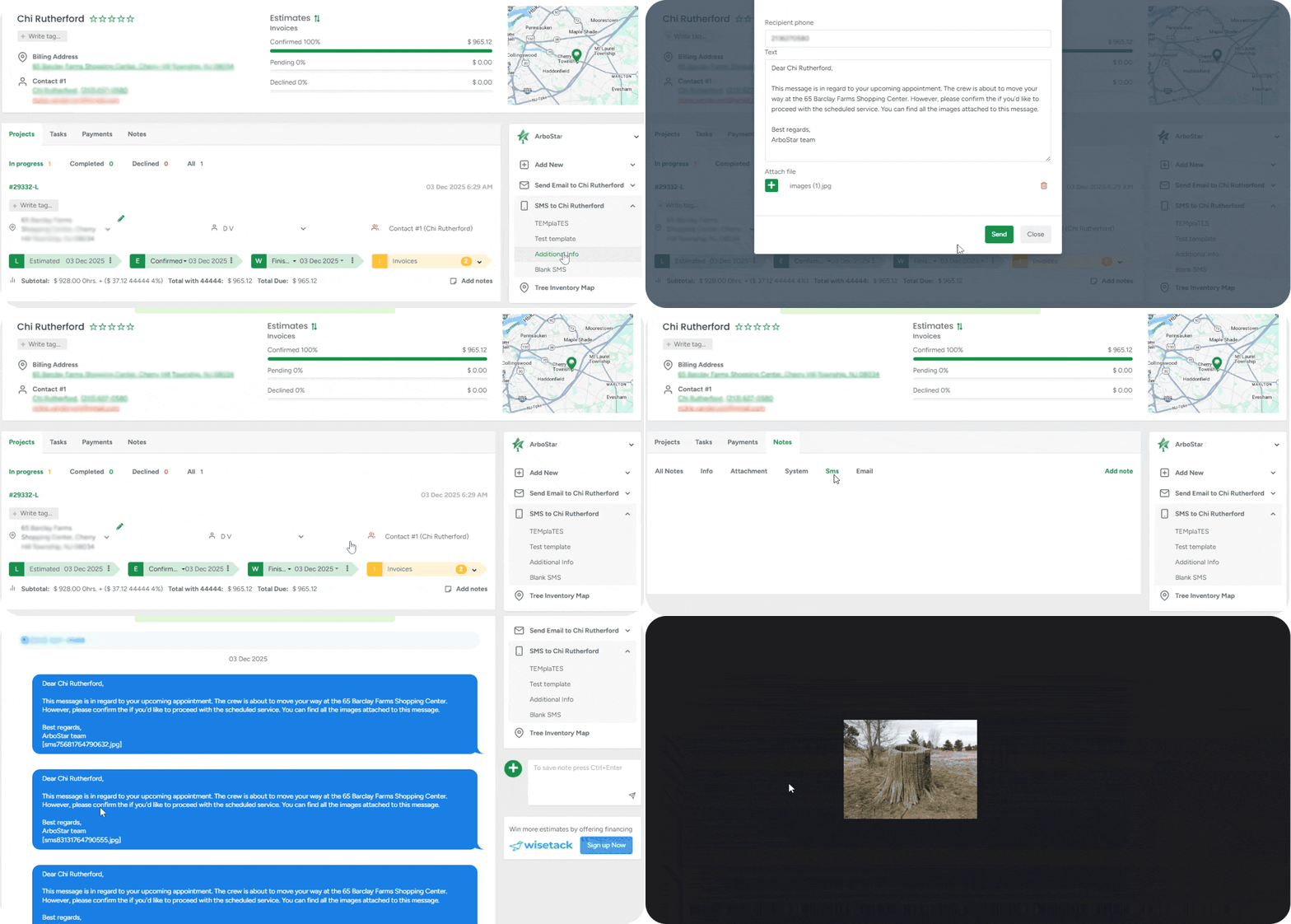
MMS Support
We are launching MMS (Multimedia Messaging Service) support to make your client communication more visual, informative, and faster than ever before. For companies operating in the US and Canada, you can now attach files directly to your text messages. This capability boosts client engagement and allows you to instantly share essential documents like PDFs or visual files like images directly to your client’s mobile phone, eliminating email delays and accelerating client response times.
Credit Notes: Seamless Invoice Adjustments
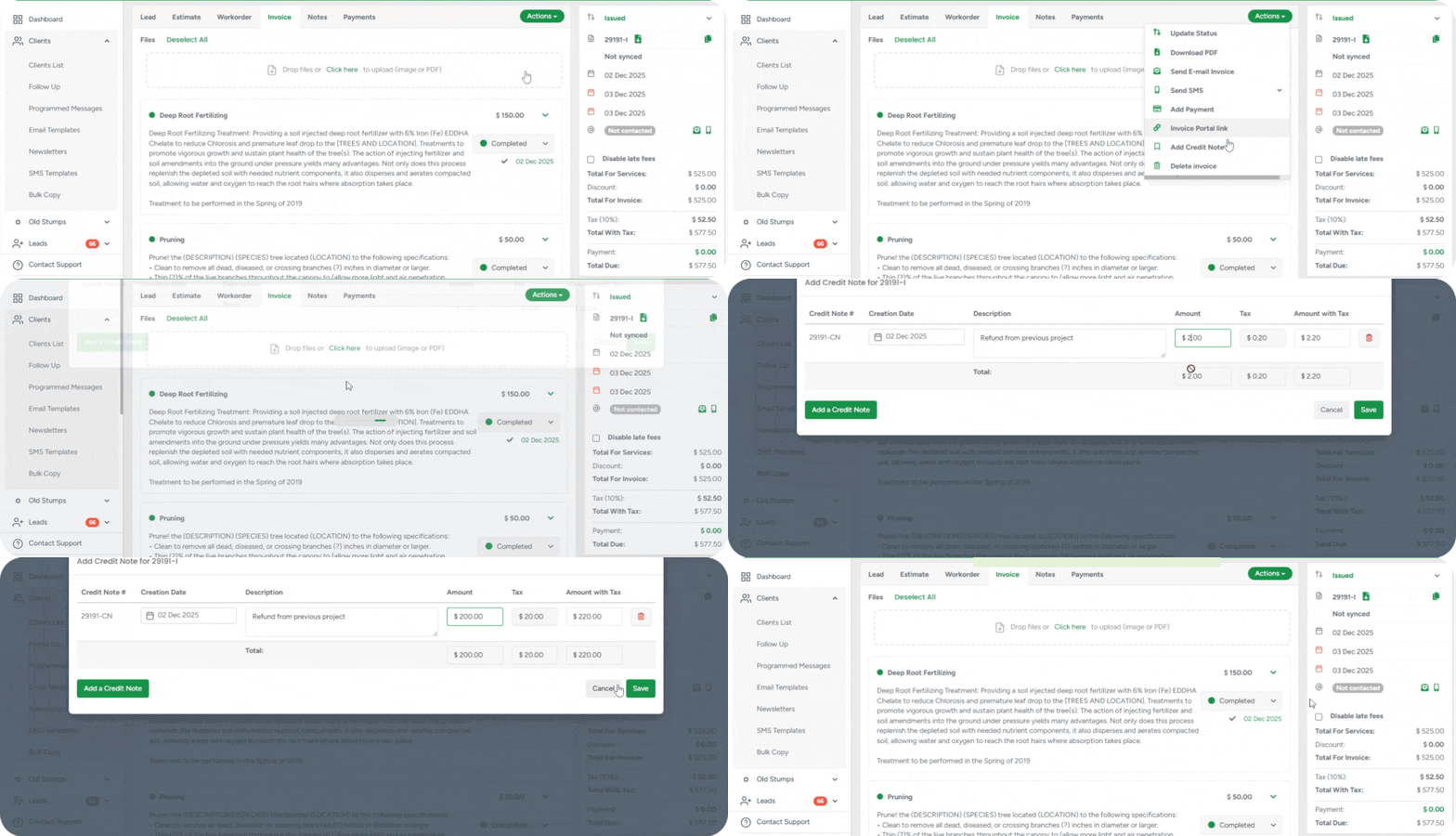
Credit Notes provide an easy and reliable way to adjust invoices when necessary—whether you need to remove a service, change the price after review, or correct the amount before the customer pays. This keeps financial records clean, prevents manual mistakes, and ensures your accounting integrations (Xero, QuickBooks and others) always match what you see in ArboStar, as a separate, linked adjustment.
Where Credit Notes Shine
Fixing an overcharge without editing the original invoice. In case you accidentally overcharged a customer for a service, instead of editing a tax-approved invoice, you can simply add a Credit Note for the difference. The Total Due updates instantly, so your customer sees the corrected amount in the Customer Portal, and your accounting system automatically syncs the changes.
Applying goodwill discounts after invoicing due to a delay or inconvenience. Instead of altering the invoice, you add a Credit Note with a description like 'Customer courtesy discount'.
Preparing for accounting audits. Credit Notes appear as separate adjustments linked to the invoice—just like in accounting platforms. This gives you a clean, auditable trail of why and when an amount was reduced, without modifying the original invoice totals or tax calculations.
Enhanced Service Groups
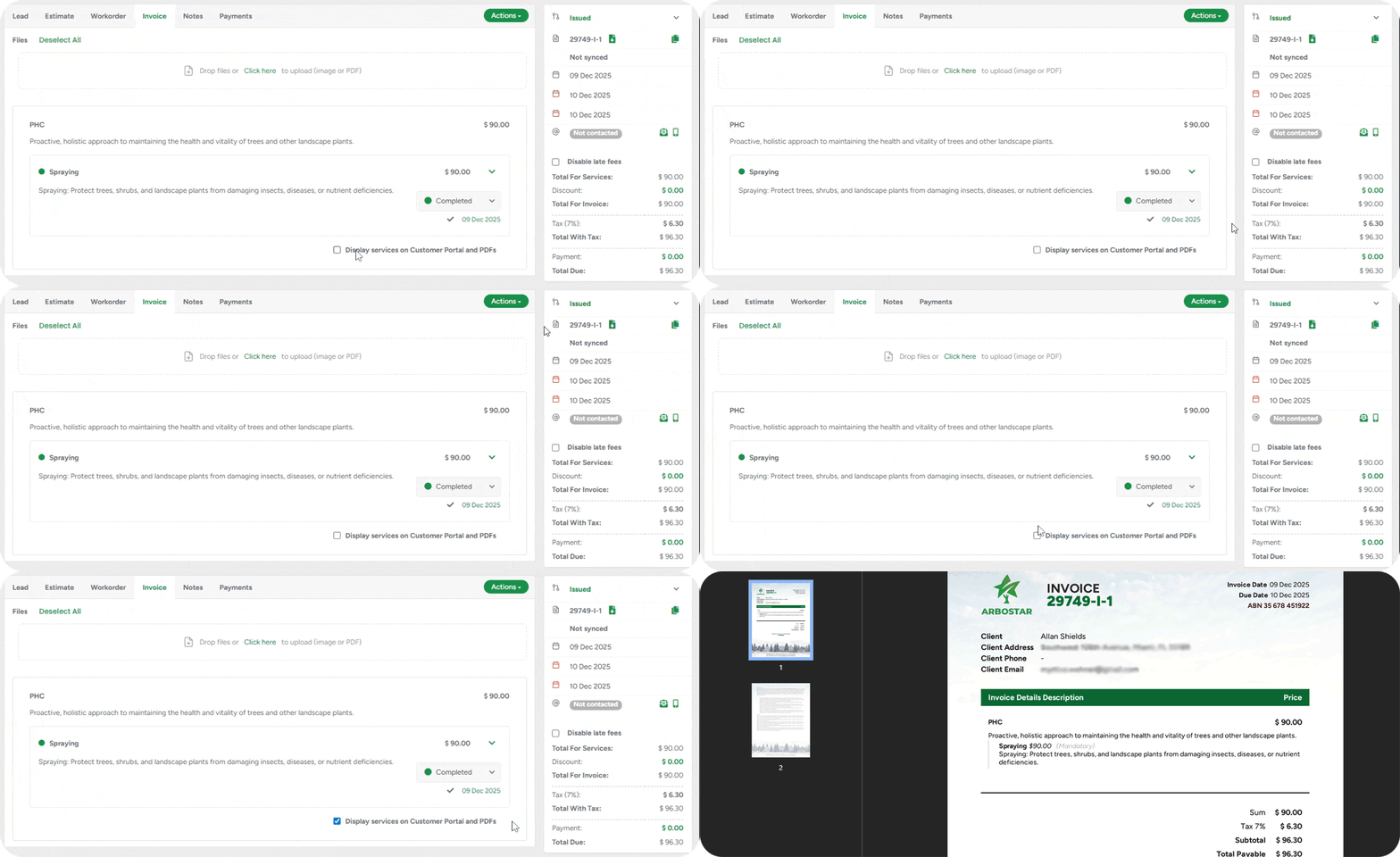
Working with Service Groups is now far more intuitive and predictable; this way, you always know exactly how your groups will look and how their items will be displayed to clients. This makes complex jobs easier to manage, reduces errors, and ensures that the same logic applies to all modules across the system that use this functionality.
WEB
APP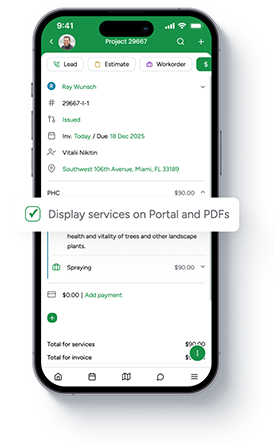
A key improvement is the unified visibility control: the Display services on Customer Portal and PDFs checkbox now appears on both Estimates and Invoices. When it’s enabled, your clients see each service and product inside the group; when it’s turned off, they see only the group name, description, and combined price.
Task Statuses Automation
Now, when a Lead’s status changes, your Tasks update automatically. If a Lead is Declined, any new Tasks for that Lead are Cancelled. If a Lead is Estimated, new Tasks for the assigned estimator are automatically marked Done. Making your tasks simpler and faster.
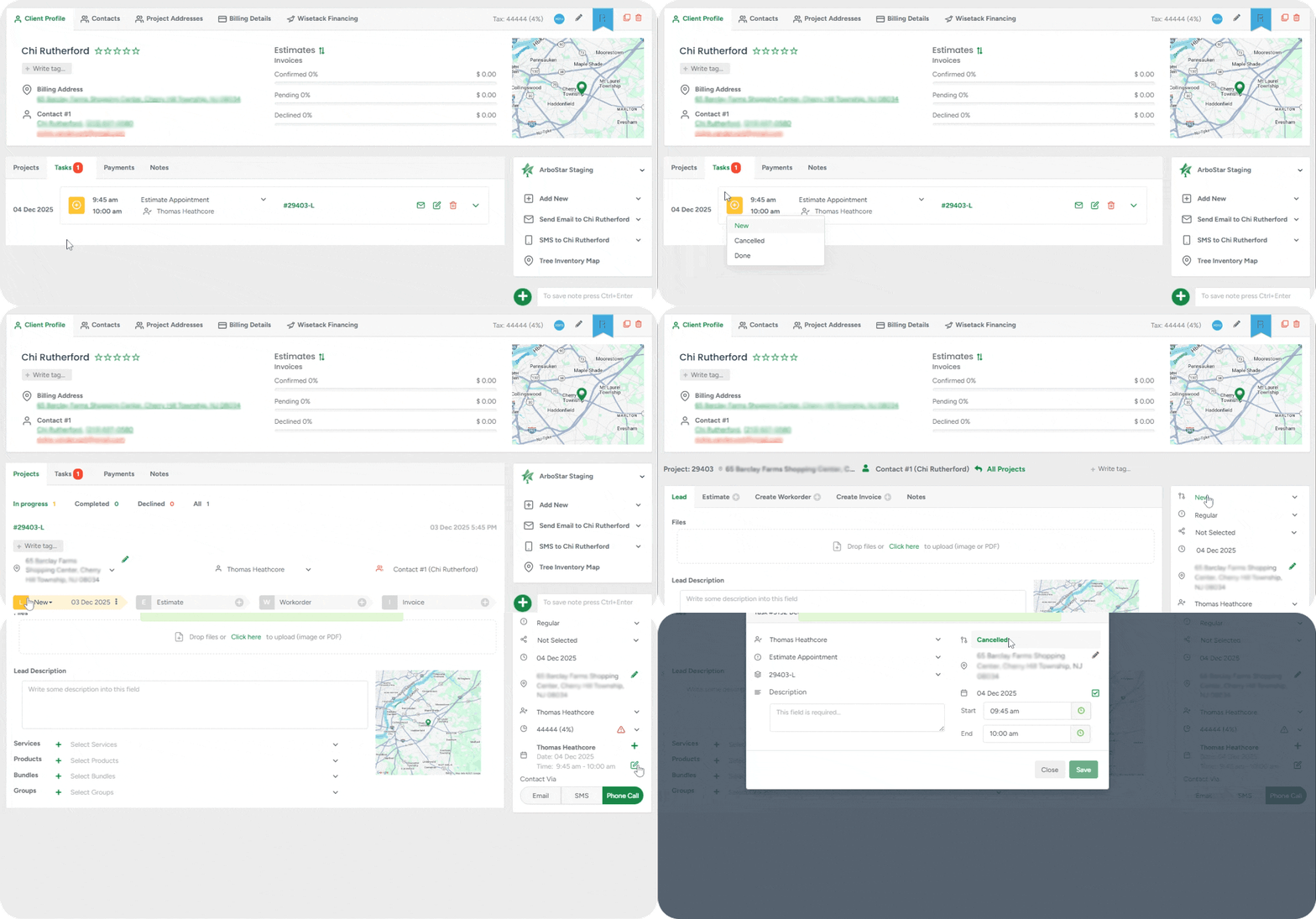
No more manual updates: Your workflow is streamlined because task statuses are updated automatically in the background.
Clear project ownership: Leads without an assigned estimator are automatically linked to the correct user when a new Task is created, reducing confusion.
Instant visibility: Tasks are organised clearly on Web and App, so you can quickly see which items need attention and focus on what matters.
Taxable Overdue Interest
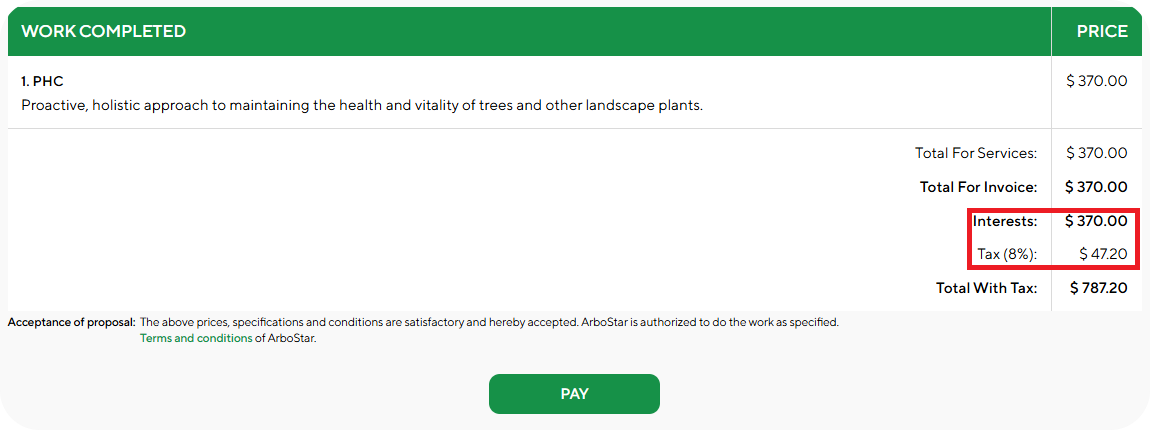
ArboStar now lets you control whether overdue invoice interest is taxable. With the new Taxable Overdue Interest setting in Company Management, interest can be either taxable or tax-free. Depending on this setting, the interest line will appear above or below the tax line on invoices and estimates in the Portal, Web, and App, ensuring accurate totals while keeping your billing clear and compliant.
Portal
APP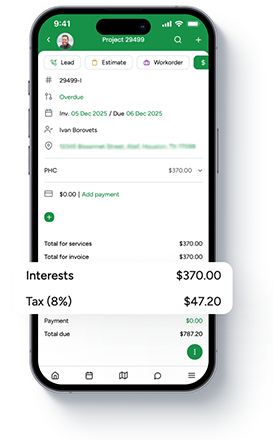
Service Statuses Automation
Whenever a service is placed on the Crew Schedule, its status now updates automatically to Scheduled, and when it's removed, it instantly reverts to New. This ensures that service statuses always reflect the real scheduling state without any manual steps, making the workflow more accurate and saving users from unnecessary clicks.
To enable this feature, please reach out to your Customer Success representative or simply chat with us.
Other improvements
Lock Financial Period Improvement — Financial locking for Workorders is now based on the Completed date of each service. This provides precise accounting control, preventing changes to specific services after a financial period is closed. You will also see a new Completed Date field under the service status in the mobile app for easy tracking.
APP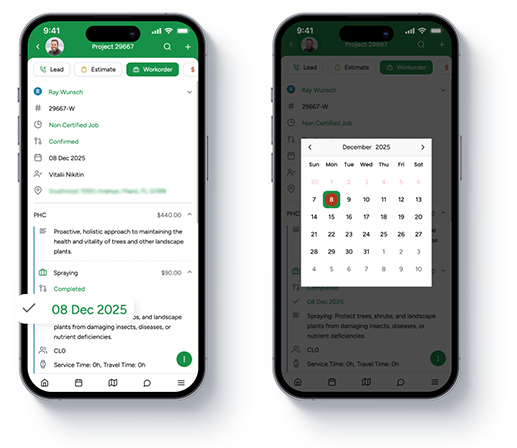
Prevent Accidental Modal Closure — the updated Add Client modal window behaviour is designed to protect your data entry. The modal will no longer close if you accidentally click outside the window, closing only when you explicitly press Cancel.
Updated Header Styles Across the Platform — All module headers throughout ArboStar have been refreshed with improved styling for a cleaner, more consistent look. Along with the visual update, several issues with header alignment and behaviour have been fixed, making navigation smoother and easier.
Performance & Stability Boost — We have tightened up performance both in Web and App: quicker screen load, improved stability and important fixes to keep your daily workflow running without interuptions. Experience it firsthand with the newest ArboStar Plus version, available for download on Google Play and App Store.