
ACH Pending Payment — Clearer Status for Payments in Progress
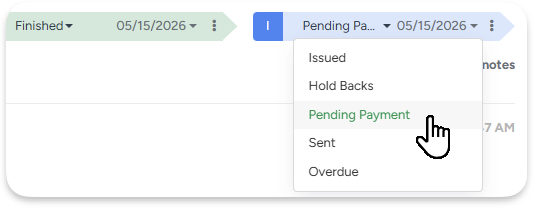
A new Pending Payment invoice status is applied automatically when a client submits an ACH payment via the Portal. While pending:
- No transition to Overdue
- No late fees or interest
- No payment reminder emails
Once confirmed, the invoice moves to Paid automatically. If it fails, it reverts to its previous status.
For Estimate deposits paid via ACH, the Estimate is immediately confirmed, and a Workorder is created — so scheduling starts right away, without waiting 3-5 business days.
The Customer Portal now shows clearer status badges. Invoice and Estimate review pages also show Amount Pending as a separate line.
Example: A $5,000 ACH deposit is submitted → Estimate confirms instantly, crew gets scheduled, invoice doesn't accrue interest. 5-7 business days later, the bank confirms and the invoice auto-updates to Paid
GPS tracking — sharper locations, faster updates
Real-time crew location tracking is now more frequent and more accurate. Whether a crew is en route between jobs or active on a property, the map reflects their actual location at all times. Enhanced infrastructure ensures consistent, reliable tracking from the first dispatch of the day to the last.
Programmed Messages — Safer Repeats
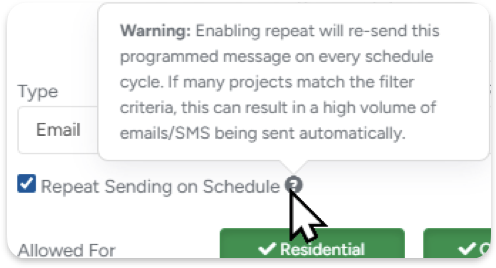
We've redesigned the Repeat option to prevent accidental mass email/SMS blasts.
"Repeat" is now "Repeat Sending on Schedule" - with a tooltip that makes it clear what you're enabling before you enable it.
When you save a message targeting 100+ projects with repeat enabled, a confirmation popup appears.
For admins, a new Dashboard banner surfaces all active high-volume repeat messages in one place - so risky configs don't go unnoticed.
New email setup — verified domains, better deliverability
Email setup has been completely redesigned. Domains and email addresses are now managed from one clean panel, and once your domain is verified, your emails go out through ArboStar's own infrastructure - meaning better deliverability and less chance of landing in spam.
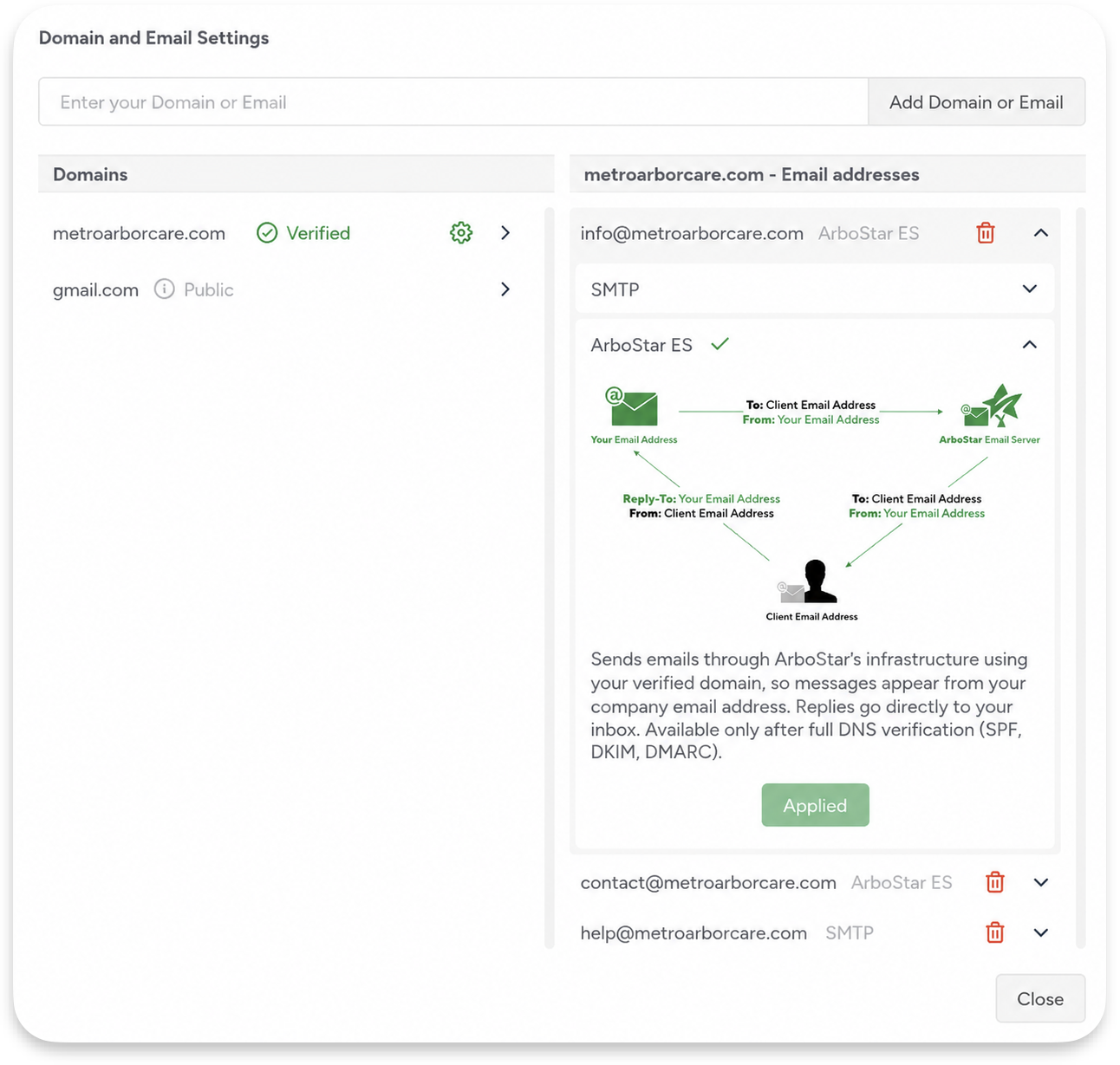
Three delivery methods are available depending on your domain setup:
- ArboStar ES - for verified domains. Best deliverability, sends through ArboStar infrastructure using your own domain name.
- SMTP - sends through your own mail server if you prefer to keep that control in-house.
- Reply-to - for unverified or public domains like Gmail or Outlook.
Once you verify a domain (SPF, DKIM, DMARC records), all email addresses under it switch to ArboStar ES automatically. Public providers are clearly marked with a "Public" badge so there's no guessing about what's verified and what isn't.
See exactly which Marketing ads are bringing in tree jobs
Track leads back to the exact Google ad they clicked - ArboStar now captures Google Click IDs and Form IDs automatically. You'll know whether a new tree removal lead came from your emergency storm damage campaign or your routine pruning ad - and that info follows the lead all the way through to the job.
Disabling an old lead source won't wipe history - If you stop running ads through a particular source, existing leads keep their origin data. Old sources just appear greyed out instead of vanishing from past records and reports.
New filters in Lead Statistics - Filter leads by Tags for campaign-level breakdowns. "Referral" is now called "Lead Source" for clarity, and a separate UTM Referral filter was added for tracking paid traffic sources.
Example: retire the "Google Ads" lead source and all 289 historical leads still show "Google Ads," not "Not Selected." Past campaign ROI stays measurable no matter how you clean up your source list.
Other updates
Financial reports that don't change the past
A/R aging reports now reflect historically accurate balances by applying Credit Notes on their creation date, and client balances are capped at $0 to avoid confusing negative values from overpayments or credits. Read more
Smarter estimated hours on the crew schedule
Estimated hours on the Crew Schedule and job profiles now exclude Declined and Completed services. When you open a work order, the total reflects only what's still active.
One click to the lead from the office schedule
Clicking a scheduled task on the Office Schedule now takes you directly to the linked lead or project - no more landing on the full project list. Hovering over a task also shows the Lead ID in the tooltip (e.g. Lead: #2485-L) so you can confirm before clicking.
Larger loan amounts available through Wisestack
Financing options for your clients through Wisestack now support higher loan amounts.