
This release makes daily work smoother for office staff and field crews. It brings easier task management, clearer job communication, faster navigation, and better client portals, payments and integrations.
Recurring office tasks and multiple attendees
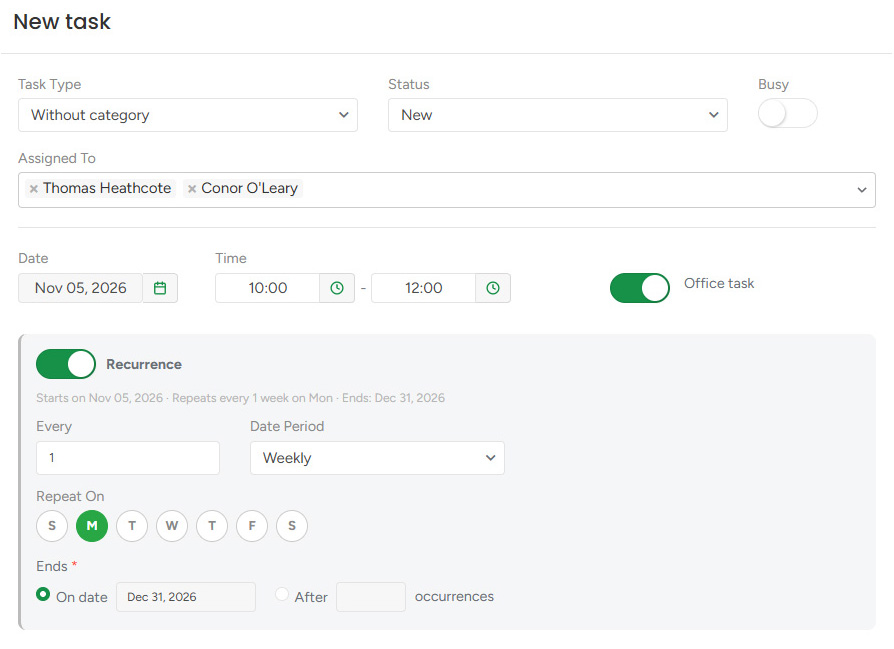
Keep your team aligned with recurring office tasks. Whether it's a weekly team meeting or a monthly safety review, turn on the Office Task toggle, set it up once, and it repeats on schedule. Add several team members to a task, and it appears on each of their calendars. You can repeat a task until a set end date or after a certain number of occurrences, and change a single meeting or the whole series anytime.
Live Search improvements
Find any record from a fragment. Type the last few digits of a phone number, part of an address, or a piece of an invoice number, and Live Search returns every Client, Lead, Estimate, Workorder, and Invoice that contains it, with the match highlighted in bold.
When a client calls and only gives part of their details, your office team can pull up the right record in seconds. Filter results by record type, reopen recent searches, and move through the list with your keyboard. If there are more matches than fit in the dropdown, click “Show More” to open the full list page with your search already applied.
Unavailable crew & equipment warnings
Equipment under repair and team members set to inactive or dismissed now show a red warning on the Crew Schedule, on web and mobile. If your chipper is in the shop, or a climber who’s left the company is still on next week’s crews, you’ll see it right away and can reassign before the crew heads out. To take equipment off the schedule completely, turn off Display On Crew Schedule. It’s removed from all upcoming crews, so your schedule shows only what’s available.
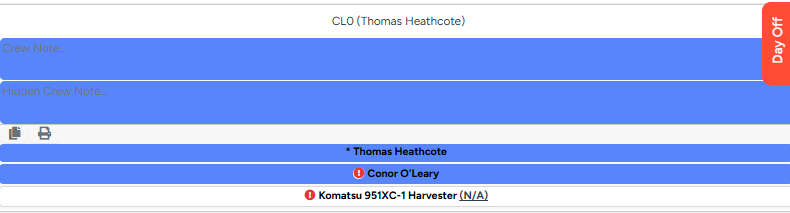
Copying a crew that includes equipment under repair also gives you a reminder to swap it.
Faster photo loading
Pages with lots of photos now load faster on web and mobile. When an estimator opens a tree inventory with dozens of tree photos on site, the previews appear quickly and use less mobile data. Every uploaded photo now gets a lightweight preview version for lists, galleries, and file blocks, while PDFs and workorders use the high-quality version so printed documents stay sharp.
iPhone photos are easier to work with, too. HEIC images are automatically converted to a standard format, and Live Photos are saved as a still image.
Mail Delivery Failure notifications
If an email to a client can’t be delivered, the sender now gets notified by email. This applies to all system emails, such as estimates, invoices and deposit requests, and to custom emails sent from the client profile.
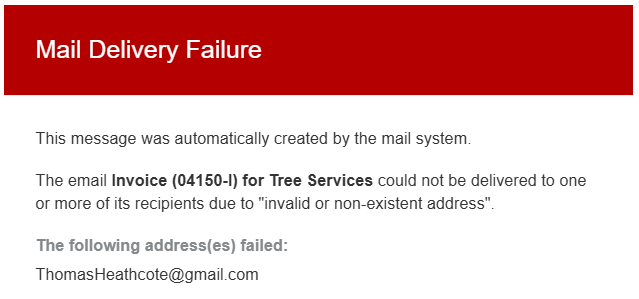
For example, if an estimator sends an estimate to a mistyped address, they’ll get a “Mail Delivery Failure” email with the address and, when available, the reason it failed. They can fix the address and resend, so the client still gets the estimate on time.
Shortened portal links
Estimate, invoice, and Customer Portal links now use a shorter ArboStar address, making SMS shorter and cleaner. Each link never expires and always opens the latest version of the document.
Property Location pin on Tree Inventory map
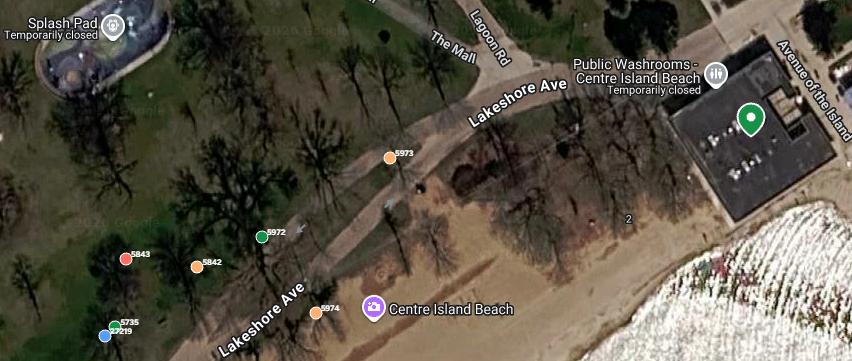
Tree Inventory maps now show a green pin at the property address, so estimators and clients can more easily orient themselves and identify trees by their position relative to the property.
Other improvements
- Customer Portal and PDFs: The Customer Portal, estimate, and invoice PDFs now show the billing client’s details. The project address and site contact appear separately only when they differ from the billing details. On PDFs, the job site contact now includes phone and email.
- Estimate confirmations: When a client confirms an estimate in the Customer Portal, the office notification email can now include office notes, tags, the assigned estimator, and the signed PDF as an attachment.
- Email templates: New variables for the project’s state and ZIP code.
- Pending ACH payments: The mobile app now shows pending ACH payments, with the amount submitted, on estimate and invoice totals.
- QuickBooks Desktop: ArboStar now has a native integration with QuickBooks Desktop. Also, payment notes now export as the payment memo, so your accountant can find a payment by its note, such as a check number.
- Custom email and SMS templates: These now show only variables for general client messages. Project-specific variables, such as the job address or estimator details, are available only in system templates.
- Mobile app stability: Improved estimate session handling to prevent timeouts during extended work and preserve your progress when receiving incoming calls or switching between screens.